⚠️ Are your customer emails going into spam?
AI Agent couldn’t resolve some of your tickets because they ended up in Spam? Or even worse — you completely missed some important emails because they went straight to Spam, and you simply can’t figure out how to adjust spam filters in Gorgias. That’s because Gorgias doesn’t have spam filters.
Sure, you can auto-close tickets and tag them as spam, in which case you should check the rules. But if your ticket is actually flagged as spam in the ticket header, then you should check the filters in your native mailbox — the place where you receive email outside of Gorgias.

When an email lands into Gorgias Spam default view, that means that it was already flagged as spam in your native mailbox. This behavior is controlled by filter settings there, so if you see a lot of customer and important emails ending up in Spam, the recommendation is to loosen up your filters or whitelist particular email addresses and domains.
See how to do it in Gmail, Microsoft 365, and Zoho Mail. If you’re using some other email client, it’s best to check directly in their resources how to manage spam settings.
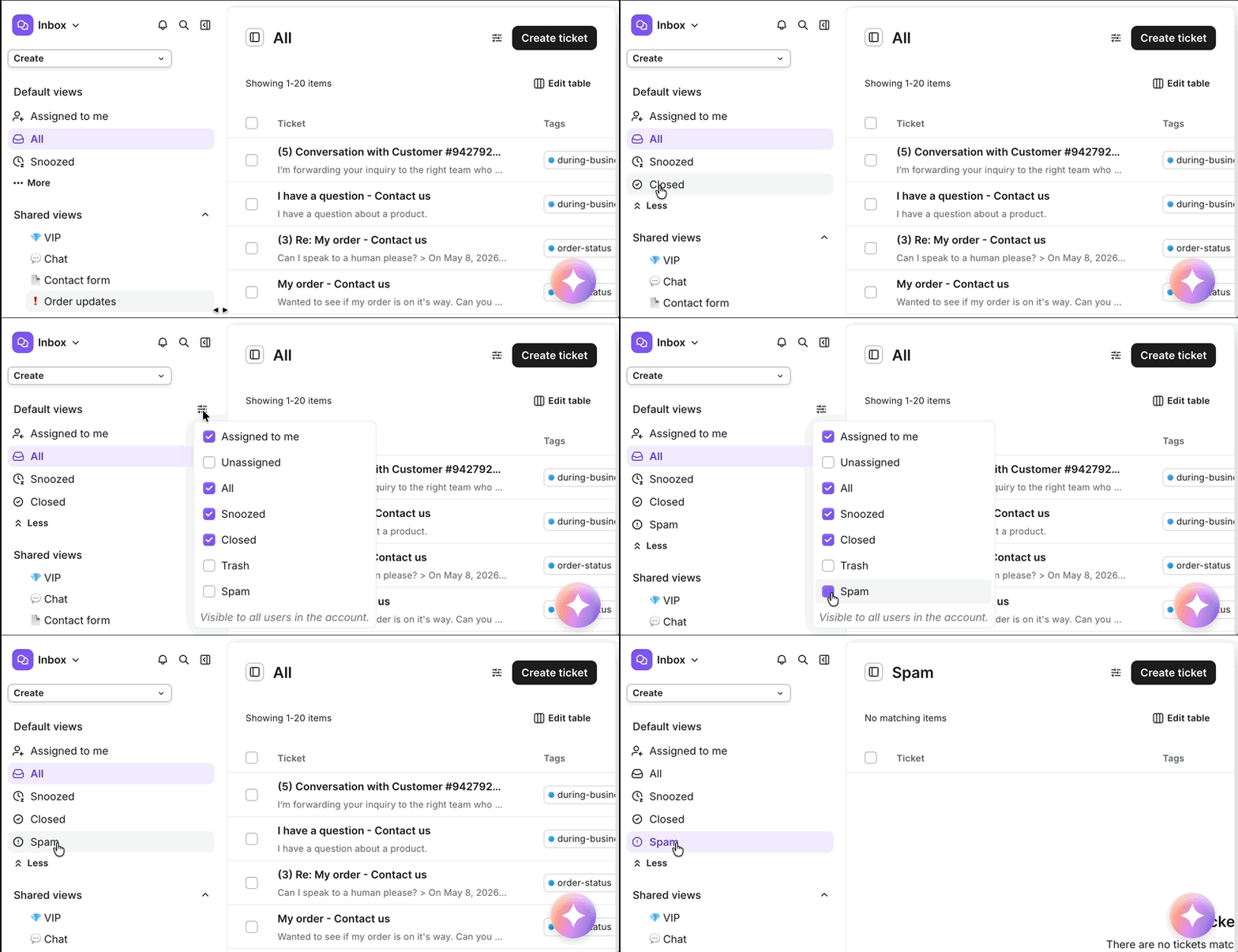
Once you’ve updated your mailbox settings in line with your company’s security policies, keep an eye on new tickets in Gorgias to confirm whether legitimate customer emails are being delivered correctly. In other words, do check that Spam folder every now and then. And if you don’t see it in your sidebar, go to your Default view settings and make it visible for your team.
How do you ensure that important emails don’t end up in spam?