🔔 Why auto-assignment matters more than you think?
Whether your team is small or large, whether you use an AI Agent or not — auto-assignment is one of those foundational settings that ensures nothing slips through the cracks.
Sure, you could manually check the Unassigned view every so often. But why build your support workflow around a habit when you can build it around a system?
Manual checks leave room for human error, and without clear ownership, tickets become fair game for cherry-picking — where agents gravitate toward easier conversations and complex ones linger.
Auto-assignment eliminates that. Tickets get distributed fairly, agents know exactly what they own, and if you have AI Agent in the mix, handovers to humans are seamless and instant.
➡️ How to set up auto-assignment
1. Create a team and add team members.
If you don’t have teams yet, structure them in a way that reflects how you operate:
By channel (email, chat, social)
Or by skillset/intent (sales, returns, order issues, subscriptions).
Each team member can be a part of multiple teams.
2. Create rules that will assign tickets to the relevant team. Make sure all types of tickets are covered (all channels, or all intents from the list)
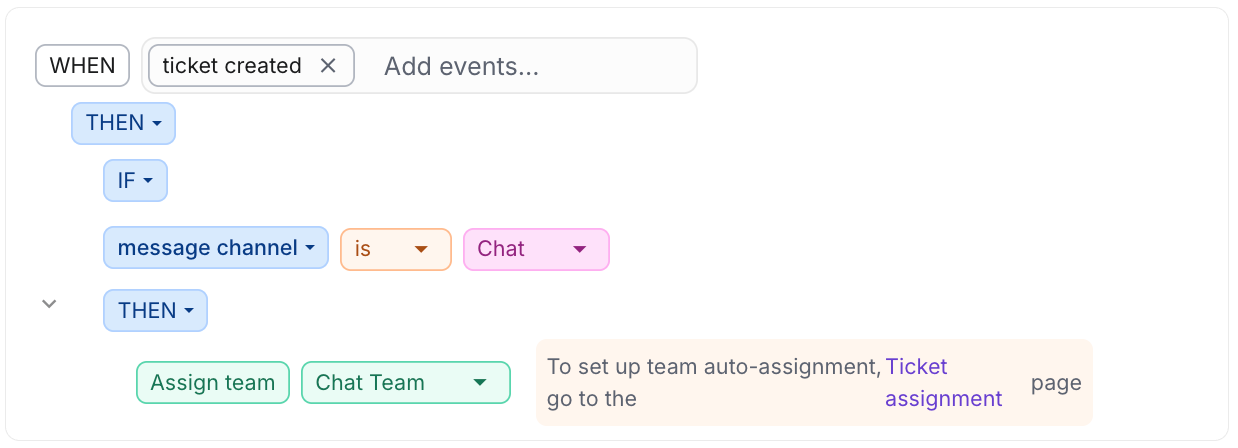
3. Enable auto-assignment in Settings → Ticket assignment

4. Set the limit for live tickets (chat, socials, SMS). Our recommended benchmark is 3, but you can go below or above that. For other tickets, you can be more flexible.

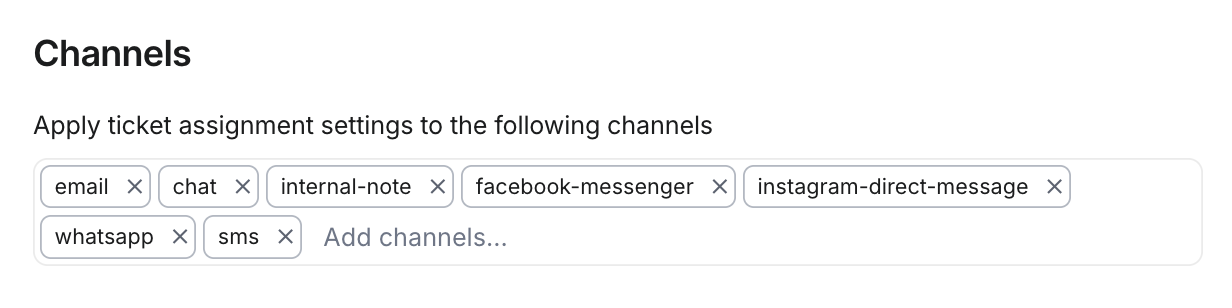
5. Add all of your supported channels at the bottom of the Ticket Assignment page.
👀 How will this work?
With this in place, every ticket gets a home the moment it's created.
If AI Agent is enabled, it takes the first pass — and if it hands off to a human, that agent is automatically assigned and immediately notified.
No AI Agent? No problem — the ticket still flows straight to the right team and the right person.
The result: clear ownership, fair workload distribution, faster response times, and a support queue your team actually stays on top of.
Need more info → find it in this article.
How do you currently manage ticket assignment?